

Toyota Corolla owners rarely think about the key fob until the moment it suddenly stops unlocking the doors from across the parking lot. One day the remote works perfectly, and the next day you’re standing beside your car repeatedly pressing the unlock button like it owes you money. The good news? In most cases, the issue is nothing more than a weak key battery. Replacing it is surprisingly simple, inexpensive, and something almost anyone can do at home in less than ten minutes.
Modern Toyota Corolla key fobs are packed with smart technology. They communicate wirelessly with the vehicle, manage remote locking, enable push-button start systems, and even provide anti-theft security. But all of that convenience depends on one tiny coin-shaped battery hidden inside the fob. Once that battery weakens, your key starts behaving unpredictably. The remote range shrinks, buttons respond slowly, and eventually the car may not recognize the key at all. According to multiple Toyota Corolla maintenance resources, most modern Corolla key fobs use a CR2032 lithium coin battery, though some older versions may use CR2016 or CR2450 batteries depending on the model year and smart key configuration.
What makes this issue frustrating is that many drivers assume the key fob itself is broken. Dealerships sometimes quote surprisingly high prices for diagnostics or replacement keys when all that’s really needed is a fresh battery costing just a few dollars. Think of the key fob like a TV remote. When the batteries fade, the remote suddenly seems unreliable even though the electronics are perfectly healthy. Understanding how to replace the battery properly can save you time, money, and unnecessary stress.
Why Toyota Corolla Key Fob Batteries Eventually Fail
Every electronic device eventually runs out of power, and your Toyota Corolla key fob is no exception. Even when you’re not actively pressing the buttons, the smart key continuously communicates with the car. That constant low-level wireless communication slowly drains the battery over time. Toyota smart keys are designed for convenience, but convenience always comes at the cost of power consumption. Many newer Corolla models even maintain communication with the vehicle while sitting in your pocket or near the car in your garage.
The average Toyota Corolla key battery typically lasts between two and five years depending on usage habits, climate conditions, and the type of key system installed. Drivers who frequently use remote start, lock and unlock the vehicle repeatedly, or keep the key close to the car at all times may notice shorter battery life. Some Toyota owners on automotive forums report batteries lasting over three years, while others replace them yearly as preventive maintenance.
Heat also plays a major role in battery deterioration. Leaving your keys inside a hot vehicle or near electronics can weaken lithium batteries much faster. Imagine the battery like an ice cube sitting under the sun. Even if it looks fine initially, internal degradation quietly speeds up in harsh conditions. This explains why some Corolla owners suddenly experience key issues during extremely hot summers or cold winters.
What surprises many people is how quickly the performance drops near the end of battery life. One week the key works perfectly, and the next week the signal becomes unreliable. Unlike larger car batteries that slowly weaken over time, coin-cell batteries often fail rapidly once voltage drops below a certain point. That sudden change catches drivers off guard and creates the impression that the entire key fob has failed.
Signs the Key Fob Battery Is Running Low
The first warning sign is usually reduced operating range. You may notice the key only works when standing very close to the car instead of unlocking doors from across the parking lot. That shrinking range is one of the clearest indicators the battery voltage is dropping. Toyota owner manuals specifically mention reduced operational range as a common symptom of battery depletion.
Another common symptom is delayed button response. You press unlock once and nothing happens. Then suddenly the doors unlock two seconds later. That lag occurs because the weakened battery struggles to send a strong signal consistently. Some owners also notice they must press the button multiple times before the car responds. It feels almost like trying to talk through a weak cellphone signal during a storm.
Newer Toyota Corolla models sometimes display dashboard messages such as “Key Battery Low” or “Key Not Detected.” Several Toyota resources confirm that smart key systems may trigger warning alerts when battery voltage drops below acceptable levels. However, not every vehicle provides an early warning. Some owners report their key batteries died suddenly without any notification at all.
You may also notice the LED light on the key fob becoming dim or inconsistent. Interestingly, the light can still blink even when the battery is too weak to transmit a proper signal. Reddit users discussing Corolla key issues frequently mention this confusion. The LED may illuminate because it requires very little power, while the wireless transmitter needs significantly more voltage to communicate with the vehicle.
One overlooked sign is intermittent push-button start failure. If your Corolla occasionally says “Key Not Detected,” especially while the key is clearly inside the car, the battery may be nearing the end of its life. Fortunately, Toyota smart keys often still allow emergency starting by holding the key directly near the push-start button. This backup feature exists specifically for low-battery situations.
Identifying the Correct Battery Type for the Key
Before opening your Toyota Corolla key fob, identifying the correct battery type is absolutely essential. Using the wrong battery can cause connection problems, poor performance, or physical fitment issues. Most modern Toyota Corolla smart keys use a CR2032 3V lithium coin battery, which is the industry standard for many Toyota vehicles.
Some older Corolla models or non-smart-key variants may use CR2016 batteries instead. Certain newer smart key systems also use CR2450 batteries depending on the trim and production year. Toyota documentation specifically notes that some Corolla smart key systems use CR2450 cells while non-smart-key systems use CR2032 batteries. This is why blindly purchasing a battery without checking can create unnecessary headaches.
Here’s a quick comparison table of common Toyota key fob batteries:
| Battery Type | Diameter | Thickness | Common Usage |
|---|---|---|---|
| CR2016 | 20mm | 1.6mm | Older Toyota remotes |
| CR2025 | 20mm | 2.5mm | Select Toyota key fobs |
| CR2032 | 20mm | 3.2mm | Most Corolla smart keys |
| CR2450 | 24mm | 5.0mm | Some advanced smart keys |
The easiest way to confirm the battery type is by opening the key fob and reading the battery label directly. The battery code is printed on the surface and usually easy to identify. Another reliable option is checking your owner’s manual. Toyota manuals typically specify the correct replacement battery under maintenance or electronic key sections.
Quality also matters. Cheap off-brand batteries may work initially but often fail much faster. Think of batteries like shoes. A low-quality pair may look fine at first, but they wear out quickly under pressure. Reputable battery brands tend to provide more consistent voltage and longer service life, which is particularly important for smart key systems.
Tools Needed Before Opening the Key Fob
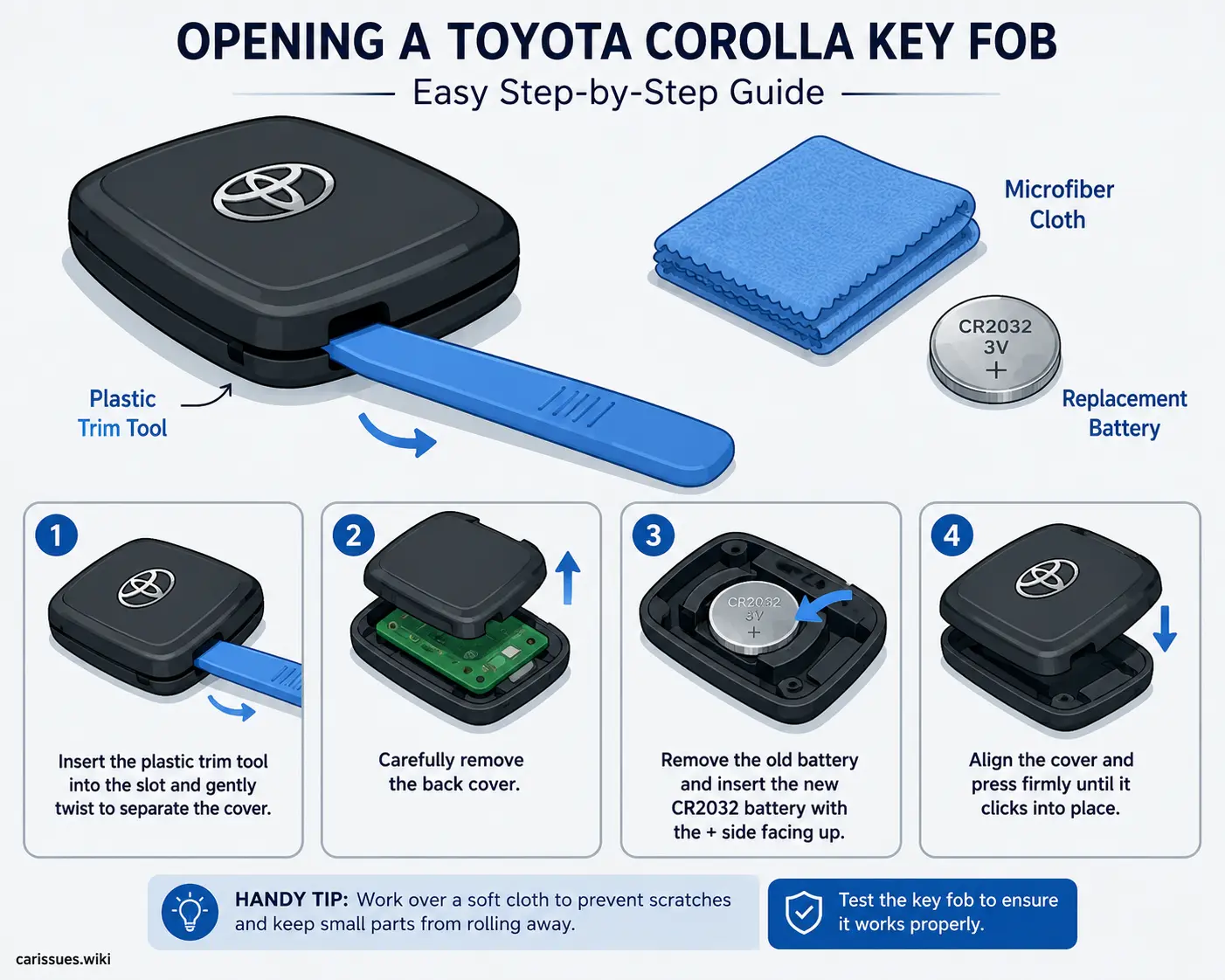
One reason people damage their Toyota Corolla key fob is using the wrong tools during battery replacement. Fortunately, you don’t need professional automotive equipment. In most cases, a small flathead screwdriver, a plastic pry tool, or even a coin is enough to safely open the key case. Toyota maintenance instructions specifically recommend small flathead screwdrivers for battery replacement procedures.
The safest option is a plastic trim tool because it reduces the risk of scratching the casing. Metal screwdrivers work fine if used carefully, but excessive force can crack the plastic shell or damage the internal circuit board. Imagine opening the fob like separating delicate puzzle pieces rather than prying open a paint can. Gentle pressure is the key.
A microfiber cloth is also helpful. Placing the key fob on a soft cloth prevents scratches during disassembly. Some people additionally use rubber gloves to avoid transferring oils from their fingers onto the battery contacts. While not mandatory, it’s a smart precaution if you want maximum battery performance and cleaner electrical connections.
You should also prepare the replacement battery before opening the fob. Leaving the internals exposed for too long increases the risk of losing small components or introducing dirt into the housing. Key fobs contain tiny clips and contact points that are surprisingly delicate. Staying organized during the process makes everything smoother and prevents unnecessary frustration.
Opening the Key Fob Without Damaging the Case
Opening the Toyota Corolla key fob properly is the step most people fear, but it’s actually straightforward once you know where the hidden release points are located. Most modern Corolla smart keys contain a removable emergency metal key tucked inside the housing. Start by pressing the release button and sliding out that emergency key.
Once the emergency key is removed, look carefully along the edge of the fob for a small notch or pry slot. Toyota key fobs are designed with a specific separation point where the plastic shell can safely split apart. Several Toyota battery replacement guides explain that inserting the emergency key or a flat tool into this slot allows the housing to open with gentle twisting pressure.
The most important rule here is patience. Many cracked key fobs result from forcing the shell open at the wrong angle. If the housing resists strongly, stop and reposition the tool rather than applying more pressure. Think of the key shell like a phone case with hidden clips. Once you hit the correct spot, it separates surprisingly easily.
After opening the shell, you’ll typically see the battery secured in a circular holder attached to the internal circuit board. Avoid touching the electronic components unnecessarily. Oils from your skin can interfere with delicate contacts over time. Toyota guides also recommend avoiding contact with electrical components using metal objects whenever possible.
Some Corolla owners become nervous when they hear small clicking sounds during opening. In most cases, those sounds are simply the retaining clips releasing. As long as you’re working carefully and evenly around the shell, the fob should separate cleanly without damage.
The Right Way to Replace and Position the Battery
Battery orientation matters more than most people realize. Installing the battery upside down is one of the most common DIY mistakes. Fortunately, Toyota key fobs are usually marked with positive (+) and negative (-) indicators showing the correct placement direction. In most Corolla key fobs, the positive side faces upward, but you should always verify using the markings inside your specific model.
When removing the old battery, use a plastic pry tool or your fingernail instead of metal whenever possible. Metal tools can accidentally bend the contact tabs or short-circuit sensitive electronics. Once the old battery is removed, compare it directly with the replacement to confirm the battery code matches exactly.
Gently slide the new battery into place rather than forcing it downward aggressively. Those tiny battery contacts act like springs. If bent too far, they may no longer maintain proper pressure against the battery surface. Some Toyota owners experiencing continued key issues after battery replacement later discovered poor contact pressure was the real problem.
Before reassembling the key, test the buttons briefly. If the LED responds normally, the battery likely sits correctly. Reattach the shell carefully, aligning all clips evenly before pressing the halves together. You should hear soft clicks as the clips lock back into place.
One smart habit is recording the replacement date somewhere. Many drivers forget when they changed the battery and later struggle to estimate battery age during future issues. A simple note in your phone can help track replacement intervals and avoid unexpected failures later.
Why the Key May Still Not Work After Replacement
Replacing the battery does not always solve the issue immediately, and that can be incredibly frustrating. Sometimes the problem has nothing to do with battery power at all. Poor internal battery contact is one surprisingly common cause. Reddit users frequently describe situations where the LED flashes only when pressing down on the battery manually, indicating unstable contact pressure inside the housing.
Another possibility is improper battery orientation. Even experienced DIYers occasionally install coin batteries upside down because both sides appear visually similar. Double-checking polarity is always worth the extra few seconds.
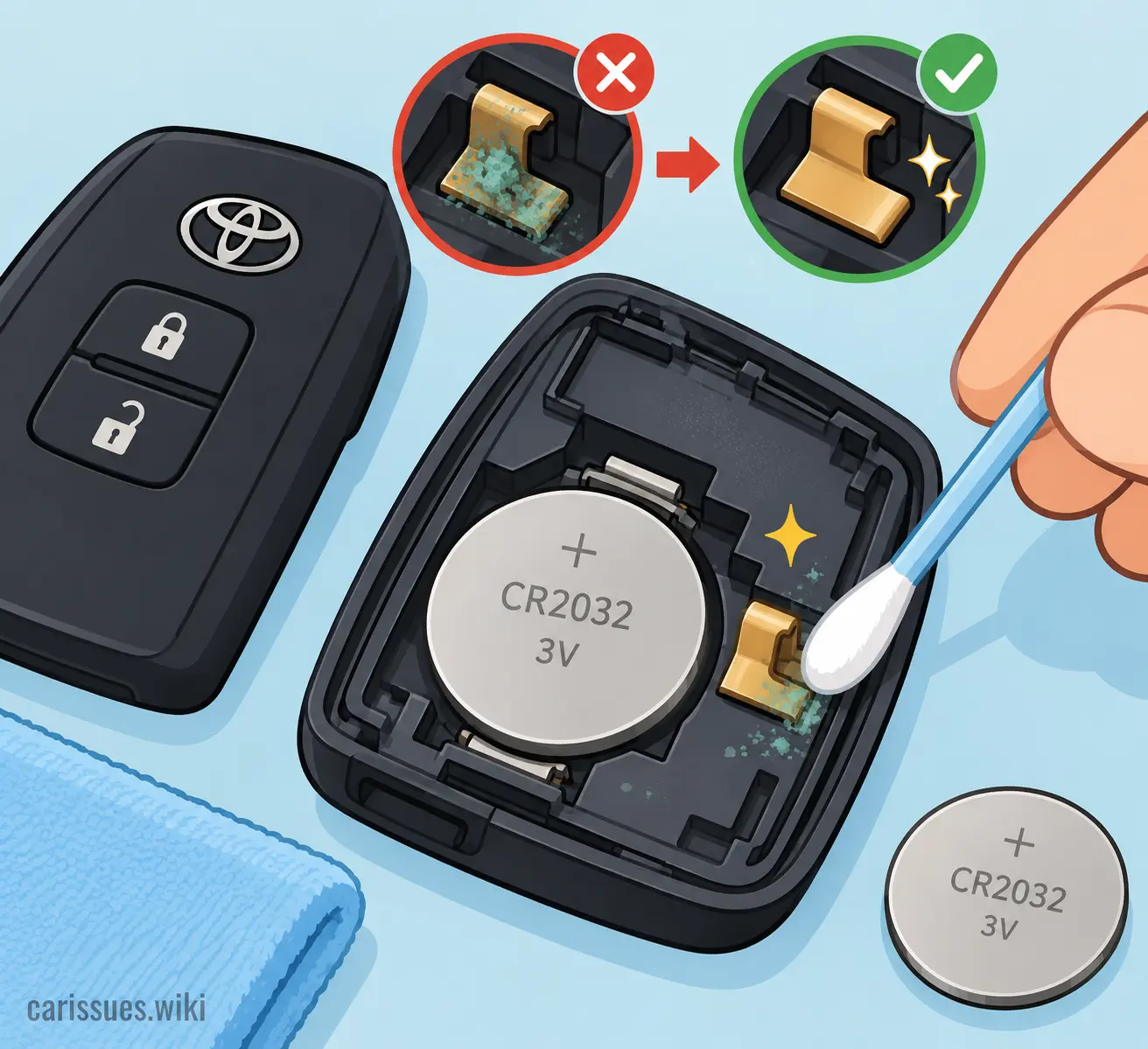
Corrosion or dirt on the battery terminals can also interfere with operation. Tiny amounts of residue may prevent stable voltage transfer between the battery and circuit board. In humid environments, oxidation can gradually build up inside the key fob over time.
Physical damage is another concern. If the key fob was dropped repeatedly, exposed to moisture, or cracked previously, internal circuit components may have loosened. Water damage is especially problematic because corrosion often continues spreading long after the initial exposure.
Some owners mistakenly believe the key requires reprogramming after every battery replacement. In most Toyota Corolla models, this is completely unnecessary. The key retains its programming even when the battery is removed temporarily. Actual reprogramming is usually only needed if the key itself becomes electronically damaged or replaced entirely.
Cleaning Battery Contacts for Better Connection
Cleaning the battery contacts can dramatically improve key performance, especially in older Corolla key fobs. Over time, microscopic corrosion, dust, and skin oils accumulate on the contact points. That contamination creates resistance, weakening electrical flow even with a brand-new battery installed.
The safest cleaning method involves using a cotton swab lightly dampened with isopropyl alcohol. Gently wipe the battery contacts and allow everything to dry completely before reinstalling the battery. Avoid soaking the electronics or using excessive liquid. Think of it like cleaning eyeglasses; a little careful maintenance restores clarity without causing damage.
If visible corrosion appears greenish or white, the contacts may need slightly more attention. A soft pencil eraser can sometimes remove stubborn oxidation safely without scratching delicate metal surfaces. Avoid sandpaper or abrasive tools because they may permanently damage the contacts.
Battery fitment also matters. The contact tabs should apply light pressure against the battery surface. If the tabs become flattened, connection problems can occur intermittently. This explains why some keys only function when squeezed manually. Carefully restoring gentle contact pressure may solve the issue entirely.
Many people replace batteries repeatedly without realizing dirty terminals are the actual problem. Cleaning the contacts during every battery replacement is a smart preventive habit that improves long-term reliability.
Reprogramming Concerns Most Owners Worry About
One of the biggest myths surrounding Toyota Corolla key battery replacement is the fear of losing programming. Many drivers hesitate to replace the battery themselves because they assume the car will suddenly stop recognizing the key. Thankfully, Toyota smart keys are designed to retain programming during normal battery changes.
In the overwhelming majority of cases, replacing the battery does not erase the key’s memory. Once the new battery is installed, the key resumes communication with the vehicle automatically. Toyota resources and owner experiences consistently confirm that standard battery replacement does not require dealer intervention.
There are exceptions, though. If the battery remains dead for an extended period, if the circuit board becomes damaged, or if the key experiences electronic failure, reprogramming might eventually become necessary. Smart key system malfunctions can also occasionally trigger “Key Not Detected” messages unrelated to the battery itself.
If your Corolla still fails to recognize the key after a proper battery replacement, try the emergency start procedure first. Most Toyota push-button start systems allow starting the engine by holding the key directly against the start button. This method bypasses weak wireless communication and uses near-field detection instead.
Drivers should also remember that spare keys matter. If one key behaves strangely while another works perfectly, the issue almost certainly lies within the problematic fob rather than the vehicle itself. Testing both keys can save hours of unnecessary troubleshooting.
Tips for Extending Key Fob Battery Life
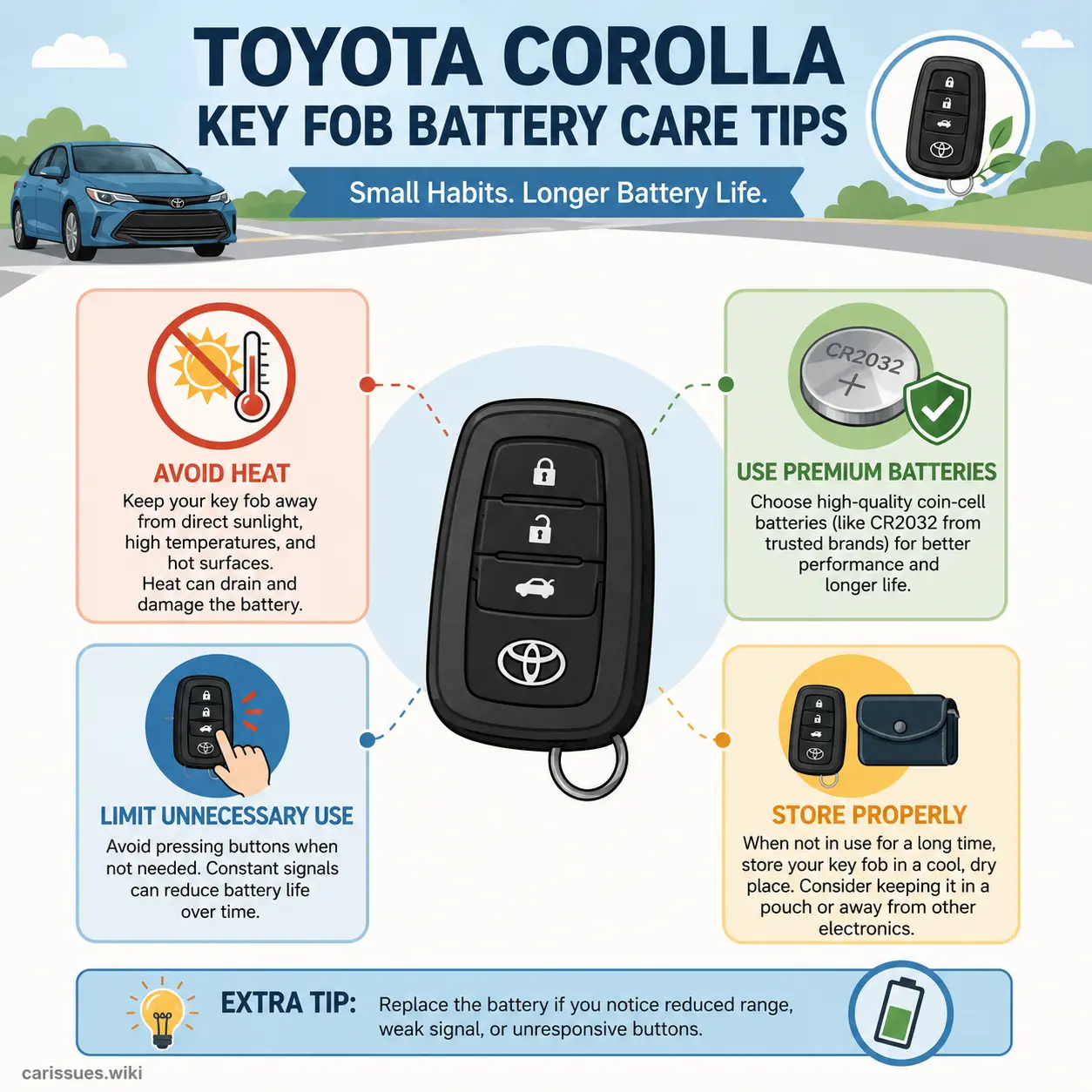
Extending Toyota Corolla key battery life mostly comes down to reducing unnecessary communication between the key and vehicle. Many owners don’t realize the smart key constantly exchanges signals with the car whenever it’s nearby. Keeping the key too close to the vehicle all the time can slowly drain the battery faster than expected. Some Toyota owners even report service advisors recommending storing keys farther away from parked vehicles.
Avoid exposing the key fob to extreme temperatures whenever possible. Heat accelerates lithium battery degradation, while severe cold temporarily reduces voltage performance. Leaving the key inside direct sunlight on a dashboard is essentially baking the electronics slowly over time.
Another helpful habit is avoiding excessive button pressing. Some drivers repeatedly hit lock or unlock multiple times out of habit, even after the vehicle already responded. While each press consumes only a tiny amount of energy, repeated unnecessary use gradually shortens battery lifespan.
Using quality batteries makes a noticeable difference too. Cheap no-name batteries often contain inconsistent lithium chemistry and weaker internal construction. A slightly more expensive premium battery may last significantly longer and provide more reliable voltage stability.
If you plan not to use the vehicle for extended periods, consider enabling battery-saving modes if supported by your Toyota model. Some newer Toyota smart keys include low-power functions designed specifically to minimize passive battery drain. Toyota owner documentation mentions these features in certain modern Corolla systems.
Conclusion
Changing a Toyota Corolla key battery is one of those small maintenance tasks that feels intimidating at first but becomes incredibly simple once you understand the process. The entire job usually takes less than ten minutes, costs only a few dollars, and can save you from unnecessary dealership visits or expensive replacement quotes. Most Corolla key fobs simply need a fresh CR2032 battery, careful handling, and proper installation to function like new again.
Understanding the warning signs of a low battery helps prevent inconvenient lockouts and frustrating no-start situations. Reduced operating range, delayed response, dashboard warnings, and intermittent detection issues are all signals that the battery may be weakening. Replacing the battery early keeps the key reliable and reduces stress during daily use.
Careful opening techniques, proper battery orientation, and clean electrical contacts are the real secrets to a successful replacement. Many post-replacement problems actually stem from dirty terminals, incorrect installation, or weak contact pressure rather than defective electronics. Patience and gentle handling make a huge difference.
Once you’ve done it yourself, the process becomes as routine as replacing TV remote batteries. That tiny coin battery may seem insignificant, but it powers one of the most important convenience features in your Toyota Corolla every single day.
FAQs
1. What battery does a Toyota Corolla key fob usually use?
Most modern Toyota Corolla key fobs use a CR2032 3V lithium coin battery, although some older or specialty models may use CR2016 or CR2450 batteries instead. Always verify by checking the old battery or your owner’s manual.
2. Do I need to reprogram my Toyota key after replacing the battery?
No, normal battery replacement usually does not erase the key’s programming. Once the new battery is installed properly, the key should work immediately without dealer reprogramming.
3. How long does a Toyota Corolla key battery last?
Most Toyota Corolla key batteries last between two and five years depending on usage habits, storage conditions, and climate exposure.
4. Why does my key still not work after replacing the battery?
Possible causes include incorrect battery orientation, poor battery contact pressure, dirty terminals, damaged internal components, or unrelated smart key system issues.
5. Can I start my Corolla if the key battery is dead?
Yes. Most Toyota Corolla push-button start systems allow emergency starting by holding the key fob directly against the start button while pressing the brake pedal.

Marco Vestri is a 29-year-old American content writer based in Spokane, Washington. He specializes in creating well-researched automotive maintenance guides, troubleshooting articles, and practical ownership advice for everyday drivers. His work emphasizes accuracy, clear explanations, and reliable sources, helping readers make informed decisions with confidence. As a regular contributor to carissues.wiki, Marco combines years of blogging experience with a passion for simplifying complex vehicle topics into useful, trustworthy content for a broad audience.